Push and Pull: How Predatory Notifications Exploit Your Attention and Compromise Your Security
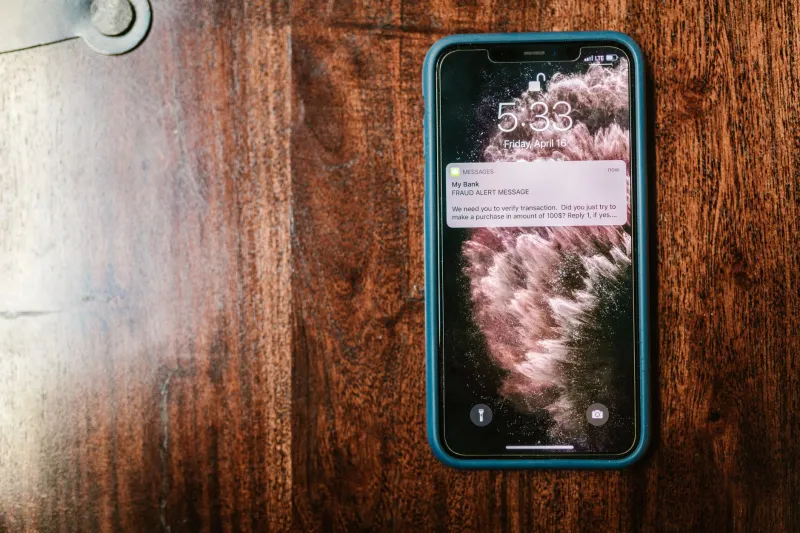
Your phone buzzes. The screen lights up with an urgent message: your bank account has been flagged, your package is delayed, or your streaming subscription is about to expire. You unlock the device and tap the notification before you have fully processed what it said. Somewhere, someone is counting on exactly that sequence of events.
Push notifications occupy a peculiar position in the digital attention economy. They are, by design, interruptions — small intrusions granted permission to penetrate whatever you are doing and redirect your focus. For legitimate services, they serve a genuine function. For bad actors, they represent a direct channel to your most impulsive decision-making, one that bypasses the skepticism you might apply to an email or a website you sought out deliberately.
This is not an accident. The mechanics of notification abuse are well understood, deliberately engineered, and increasingly difficult to distinguish from the real thing.
The Architecture of Urgency
Behavioral researchers have long documented the human tendency to respond more quickly and less carefully to stimuli framed as urgent. Notifications exploit this tendency structurally. They arrive without invitation, they disappear if ignored, and they often contain just enough information to create anxiety without enough context to allow rational evaluation.
A notification reading "Suspicious login detected — verify now" triggers a stress response calibrated by evolution to prioritize fast action over careful analysis. The legitimate version of this alert, sent by your actual bank, and the fraudulent version, crafted by a phishing operation, are often visually and linguistically indistinguishable. Both arrive as a small rectangle at the top of your screen. Both use urgent language. Both present a call to action.
The difference lies in where that call to action leads — and in the fraction of a second most users spend deciding whether to follow it.
How Malicious Actors Gain Notification Access
The pathways through which bad actors acquire the ability to send you notifications are more varied than most users recognize.
Rogue applications represent the most direct route. An app downloaded from an unofficial source, or one that slipped through app store review processes, can request notification permissions under the guise of a legitimate function — price alerts, news updates, delivery tracking — and then use that permission to deliver phishing lures, fake security warnings, or fraudulent prize notifications.
Browser-based notification subscriptions have become a significant and underappreciated threat vector. When a website prompts you to "Allow" notifications in your browser, it is requesting the ability to send messages to your desktop or mobile device even when you are not actively visiting that site. A substantial ecosystem of low-quality and outright malicious websites uses deceptive prompts — phrased as CAPTCHA verification, age confirmation, or video playback requirements — to trick users into granting this permission. Once granted, these sites can deliver a continuous stream of fraudulent alerts that mimic system warnings or financial institution messages.
Compromised legitimate apps present a subtler problem. A developer whose backend systems have been breached, or whose push notification service provider has been infiltrated, may inadvertently become a conduit for malicious messages sent through an otherwise trusted channel. Users who receive an alarming notification from an app they genuinely use and trust have far less reason to pause before acting.
The Credential Harvest Behind the Alert
The most common end goal of a predatory notification is credential theft. The alert creates urgency; the link it contains leads to a convincing replica of a legitimate login page; the user enters their username and password; those credentials are captured and used — or sold.
This attack pattern, sometimes called notification phishing or push phishing, has grown substantially more sophisticated as fraudsters have adopted adversary-in-the-middle proxy tools that allow them to capture not just passwords but active session tokens and multi-factor authentication codes in real time. The technical barrier to executing a convincing notification-based phishing campaign has fallen considerably in recent years, even as the campaigns themselves have become harder to identify.
Financial fraud represents the other primary objective. Fake delivery notifications prompt users to pay fabricated customs fees. Counterfeit subscription renewal alerts direct users to enter payment details on spoofed billing pages. Fraudulent prize or reward notifications funnel users through a series of steps designed to extract personal information or small payments that aggregate into significant losses at scale.
The Federal Trade Commission reported that Americans lost more than $10 billion to fraud in 2023, with imposter scams — a category that includes notification-based deception — accounting for the largest share of reported losses.
Reclaiming Control: A Granular Approach
Defending against notification abuse requires action at multiple levels, from the device settings you may never have revisited to the habits you apply in the moment an alert arrives.
Audit your existing permissions aggressively. On iOS, navigate to Settings > Notifications to review every application that has permission to alert you. On Android, the equivalent is found under Settings > Apps > [App Name] > Notifications. Remove notification access from any app that does not have a clear and ongoing need to reach you. The majority of applications on most users' devices do not require this permission to function.
Revoke browser notification subscriptions. In Chrome, open Settings > Privacy and Security > Site Settings > Notifications. In Firefox, navigate to Settings > Privacy & Security > Permissions > Notifications. Review the list of permitted sites carefully and remove any that you do not recognize or no longer actively use. Consider setting your browser's default to block all notification requests, requiring sites to ask permission explicitly each time rather than holding standing access.
Apply a deliberate pause before acting on any alert. Security professionals recommend a simple rule: never navigate to a sensitive account through a notification link. Instead, open your browser independently, type the institution's address directly, and log in through that route. If the alert was legitimate, the concern will be reflected in your account. If it was not, you have avoided the trap entirely.
Scrutinize notification content for pressure language. Phrases like "act immediately," "your account will be suspended," or "limited time" are as common in fraudulent notifications as they are in legitimate ones — but their presence in an unsolicited alert should always trigger heightened scrutiny rather than accelerated action.
Keep applications and operating systems current. Security patches frequently address vulnerabilities in notification handling and permission enforcement. Delayed updates leave known gaps open.
The Attention Economy's Security Debt
The notification system, as implemented across modern operating systems, was never designed with adversarial conditions in mind. It was built to deliver information efficiently. The assumption embedded in its design — that the entities granted permission to use it would do so honestly — has proven optimistic.
Until platform developers implement more rigorous verification and transparency requirements for notification senders, the responsibility for managing that risk falls on individual users. The mechanics of notification abuse are not difficult to understand. The habits required to resist them are not complicated to adopt. What they require is the recognition that the small rectangle that appears at the top of your screen is not a neutral messenger — it is a channel that someone, somewhere, may be working very hard to exploit.